

New Xbox Insider Update 2026: Best Settings and Personalization Options
- Platforms: Xbox Series X|S, Xbox One
- Release Year: 2026
- Update Availability: Alpha Skip-Ahead Xbox Insiders
- Key Focus: Console personalization and system information
Microsoft has launched a new Alpha Skip-Ahead update for Xbox consoles in 2026, providing users with the best settings and optimized settings to manage their hardware. This high FPS guide and system update allows players to Personalize Your Experience through New Color Options, while also integrating tools to track system health directly from the dashboard. These features are currently available to select Alpha Skip-Ahead Xbox Insiders, with a broader rollout planned for all users in the future.
Understanding the Latest Xbox Console Update Personalization Options Explained
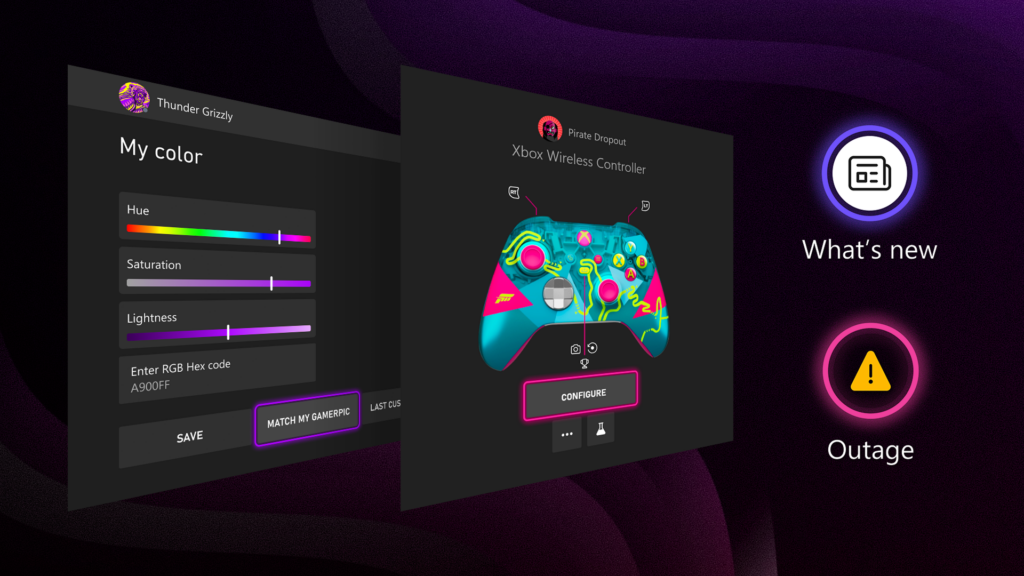
The core of this 2026 update centers on giving players more agency over their console interface. For users looking to refine their setup, the update introduces granular control over display aesthetics. By navigating to the personalization menu, players can now input specific hex color codes to achieve a precise look. Additionally, a new feature allows the system to pull a color palette directly from a user’s gamerpic, ensuring the dashboard matches their chosen identity. Before finalizing these changes, the system provides a preview of how the chosen color will appear across the interface.
At In Game News, we have monitored how these adjustments impact the user experience. By allowing users to match their system theme to their personal profile, Microsoft is moving toward a more cohesive UI. This update follows our Xbox coverage regarding the evolution of the dashboard, which now prioritizes accessibility and visual feedback.
Hardware Management and Controller Visibility
Managing hardware is a critical part of the gaming experience, and the latest update makes this process more transparent. The Xbox Accessories app has been updated to provide a visual representation of the specific controller currently connected to the console. This includes support for the standard Xbox Wireless Controller, models equipped with the Share button, and the Xbox Elite Wireless Controller Series 2.
This visual confirmation is intended to assist players when they are remapping buttons or adjusting stick sensitivity. By seeing the exact hardware model on screen, users can ensure they are modifying the correct device settings without confusion. This is particularly useful for players who rotate between multiple controllers for different game genres or competitive play styles.
What is Included in the New Xbox Insider Dashboard Update
Beyond visual customization, the update improves how players receive information regarding their console and the Xbox network. Following a system update, players can now access release notes directly from the top navigation bar on the Home screen. These notes have been expanded to include more specific details regarding new features, system changes, and resolved bugs. For those enrolled in the Xbox Insider program, the hub now links directly to release notes specific to their preview ring, ensuring that information is relevant to the specific software version they are running.
Furthermore, the update addresses the need for real-time network information. Players no longer need to rely on external websites or social media channels to verify if a connection issue is local or widespread. If the Xbox network experiences a confirmed outage, a status indicator will appear in the upper-right corner of the screen. Clicking this indicator directs the user to a service status page, which provides details on affected services and estimated resolution times.
Key Improvements in the 2026 Update
- Hex Color Input: Allows for exact color matching for system themes.
- Gamerpic Integration: Automatically selects a theme color based on the user's gamerpic.
- Visual Controller Mapping: Displays the specific connected controller in the Accessories app.
- In-Dashboard Status: Provides immediate alerts for Xbox service outages.
- Direct Release Notes: Accessible via the Home screen navigation after system updates.
Feedback and Future Development
Microsoft continues to utilize the Xbox Insider program to shape the trajectory of console features. The company recently introduced "Xbox Player Voice," a dedicated platform intended to streamline how user feedback is gathered and reviewed. This initiative allows developers to organize suggestions effectively, determining which ideas are feasible for implementation and which require further consideration.
For those interested in how these updates affect the broader ecosystem, our gaming hardware analysis provides additional context on how these software changes complement the existing Xbox Series X|S architecture. The team behind the Xbox Insider program encourages users to share their thoughts through the official portal at aka.ms/XBOXplayervoice. While not all suggestions can be implemented immediately, the feedback loop remains a primary driver for the features included in these periodic updates.
As these features move out of the Alpha Skip-Ahead ring, the general player base can expect a more refined, informative, and personalized dashboard. By focusing on user-requested tools—such as the ability to check service status on console and improved color customization—the 2026 update aims to reduce the friction between the player and their gaming environment. We will continue to provide updates as these features reach a wider audience.
Frequently Asked Questions
What new features are in the latest Xbox Insider update 2026?
The update introduces expanded color customization, on-screen controller visibility, improved release notes access, and direct Xbox service status indicators on the console dashboard.
How to use on-screen controller visibility on Xbox?
You can view an image of your connected controller, including Elite Series 2 or standard models, by opening the Xbox Accessories app on your console.
How to check Xbox service status on console?
If a service issue is confirmed, an indicator appears in the top-right corner of your screen, allowing you to click through to a status page for real-time updates.
Paralives Modding Policy: Adult Content and Steam Workshop Rules 2026Game Updates
Pokémon Pokopia Trainer Rank Guide: How to Unlock Areas in 2026007 First Light
007 First Light Patch Notes: Technical Fixes and Known Issues for 2026Nintendo
Former SEGA Executive Criticizes Yuji Naka in 2026 Interview