
MangoHud 0.8.2 Powers Up Linux Gaming Monitoring
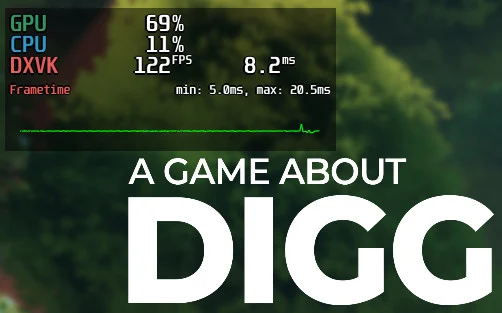
Linux gamers, get ready to elevate your performance monitoring game! The highly acclaimed and indispensable performance overlay, MangoHud, has just released its anticipated version 0.8.2. Following an intensive period of testing, this update delivers a robust suite of new features and crucial fixes, solidifying MangoHud's position as an essential tool for optimizing and understanding your Linux gaming experience. Whether you're a casual player or a hardcore enthusiast, MangoHud 0.8.2 promises enhanced stability and deeper insights into your system's performance.
Unleashing New Performance Metrics
Version 0.8.2 introduces an array of groundbreaking parameters, empowering users with unprecedented control and detailed data visualization. Beyond the foundational CPU, GPU, FPS, and frame timings, gamers can now dive deeper into their hardware's behavior.
gpu_efficiency: Displays GPU efficiency in frames per joule.cpu_efficiency: Provides CPU efficiency metrics in frames per joule.flip_efficiency: Allows flipping efficiency display to joules per frame.gpu_power_limit: Shows the current GPU power limit.horizontal_separator_color: Customizes colors for horizontal separators in horizontal layouts.core_type: Reveals CPU core types (e.g., Intel performance/efficient cores, ARM codenames).proc_vram: Monitors process-specific VRAM usage, a crucial insight for demanding titles.ftrace: Integrates information about trace events reported via ftrace.font_size_secondary: Offers customizable font size for secondary metrics (default 0.55 * font_size).MANGOHUD_FPS_LIMIT: A new environment variable to set a global FPS limit for applications.fps_limit: Now accepts decimal values for finer control.dx_api: An experimental feature attempting to display the underlying DirectX API being used.
These new metrics, exemplified by the vivid proc_vram display and custom separators seen in titles like ARC Raiders, offer an unparalleled level of customization and diagnostic capability.
Critical Fixes & Expanded Platform Support
Beyond new features, MangoHud 0.8.2 addresses numerous stability issues and expands compatibility, ensuring a smoother experience across a wider range of hardware and software configurations.
Key Bug Fixes Include:
- Resolved LLVMPIPE crashes related to vsync status checks.
- Fixed X11 crashes occurring when the `$DISPLAY` environment variable was not set.
- Corrected incorrect ImGui content width calculations.
- Ensured GPU/CPU load properly respects the alpha option.
- Addressed XNVCTRL functionality issues when NVML was absent.
- Mitigated multiple instances of MangoHud crashing on close.
- Restored full functionality for keybinds in various Wayland environments.
- Implemented extensive fixes for OpenGL, resolving issues like missing/flickering HUDs and games failing to start.
- Prevented Mangoapp crashes when the X11 session disappeared.
- Rectified issues preventing Feral launcher games from starting with MangoHud (when the
execoption isn't used).
Enhanced Compatibility & Changes:
- Removed dependencies on GLEW and nlohmann, streamlining the codebase.
- Added CPU MHz logging for more precise performance tracking.
- Blacklisted all GTK-4 applications for improved compatibility.
- Introduced official Panfrost GPU support.
- Enabled RAPL usage with AMD CPU power for advanced monitoring.
- Added Qualcomm KGSL support, broadening mobile and embedded Linux compatibility.
- Integrated APM XGene support.
- Blacklisted the Marvel Rivals launcher.
- Mangoapp can now check for the presence of vkbasalt and gamemode.
- Updated
amdgpu v3_0 gpu_metricsto support more recent AMD APUs.
This update marks a significant leap forward for Linux gaming, providing users with a more stable, versatile, and informative performance overlay. Dive into MangoHud 0.8.2 and take full command of your gaming analytics. For more detailed information and installation instructions, be sure to visit the official GitHub repository.