
Crimson Desert Patch 1.03.00 Adds New Camera Settings in 2026
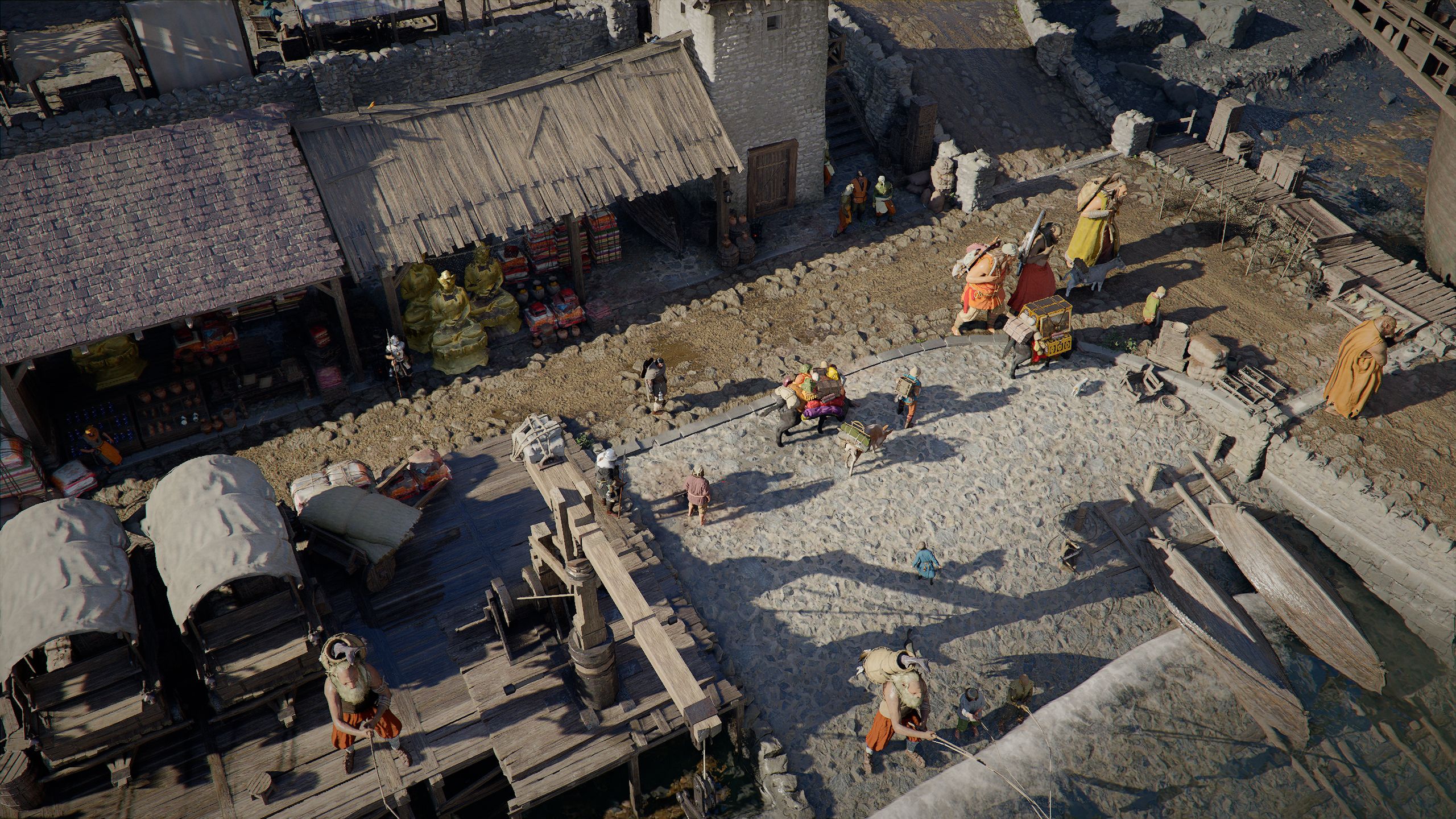
- Game: Crimson Desert
- Developer: Pearl Abyss
- Release Date: March 19, 2026
- Latest Update: Patch 1.03.00
Players looking for an experience reminiscent of Baldur's Gate 3 or BG3, developed by Larian Studios, can now experiment with new camera perspectives in Crimson Desert. While the title remains a third-person action RPG, the latest Pearl Abyss Crimson Desert latest patch notes 2026 reveal that update 1.03.00 has introduced a suite of accessibility sliders that permit a significantly wider field of view. These changes offer a shift in visual presentation that brings the game closer to the isometric aesthetic often associated with titles like Diablo 4, including its Vessel of Hatred expansion.
Understanding the Crimson Desert Patch 1.03.00 Update Details
The update, which arrived earlier this month, was primarily focused on quality-of-life improvements. Among these, the addition of specific camera controls stands out as a notable inclusion for players who prefer a different vantage point while traversing the open world. Unlike traditional camera modes that are fixed, these settings provide a high level of user control over how the game is displayed on the screen.
It is important to clarify that these settings do not alter the core gameplay mechanics of Crimson Desert. Despite social media comparisons suggesting a shift toward the style of Diablo 4 or BG3, the game remains an action-oriented experience. The camera adjustments are purely visual, providing a new way to observe the environment rather than changing how combat or movement functions.
How to Change Camera Settings in Crimson Desert
For players who want to adjust their view, the process is straightforward. By accessing the main menu, users can navigate to the "Others" tab and select the "Accessibility" sub-menu. Within this section, Pearl Abyss has provided four distinct sliders that dictate the behavior of the camera:
- Camera Visual Range: Controls how much of the environment is rendered within the frame.
- Camera Distance: Determines how far the camera is positioned from the character, Kliff.
- Camera Vertical Offset: Adjusts the height of the camera relative to the character.
- Camera Horizontal Offset: Shifts the camera left or right from the center position.
By increasing these values, players can pull the camera back to a significant distance, creating a top-down perspective. It is worth noting that the game retains a collision system; if the camera encounters an obstacle such as a building or a large structure, it will automatically zoom in to maintain a clear line of sight on the protagonist, Kliff.
Impact of New Crimson Desert Camera Accessibility Options
The inclusion of these tools serves as a benefit for players who may have specific accessibility needs or those who simply enjoy customizing their visual experience. By allowing users to dictate exactly how they view the world of Crimson Desert, Pearl Abyss has provided a level of flexibility that is rarely seen in standard action RPGs. As we have noted in our RPG news coverage, the ability to modify the camera can significantly alter the sense of scale within a game world.
While the "isometric" look is a byproduct of these settings rather than an intended gameplay mode, it highlights how much control players can exert over the game's presentation. Whether you are exploring the terrain or navigating through dense structures, the system is designed to revert to a standard third-person view when necessary to prevent visual obstructions. This balance ensures that while the perspective can be altered, the functionality of the game remains consistent.
Technical Context and Future Updates
As Crimson Desert continues to evolve following its March 19, 2026 release, players are encouraged to check the official patch notes for further adjustments. The implementation of these camera sliders in patch 1.03.00 is part of a broader effort by the developer to refine the user experience on PC and console platforms. In Game News will continue to track these updates as they are released.
For those interested in optimizing their setup, we recommend starting with the sliders at 100% and adjusting them incrementally until the desired aesthetic is achieved. Because the camera behaves dynamically when near obstacles, finding the right "sweet spot" for the horizontal and vertical offsets may take some trial and error depending on the region of the map being explored.
Frequently Asked Questions
If you are looking for more information regarding these changes, the following answers address the most common inquiries regarding the recent update.
How do I change camera settings in Crimson Desert?
You can change camera settings by navigating to the 'Others' menu and selecting 'Accessibility,' where you will find sliders for Camera Visual Range, Distance, and offsets.
What are the new Crimson Desert camera accessibility options?
The new options include four specific sliders: Camera Visual Range, Camera Distance, Camera Vertical Offset, and Camera Horizontal Offset.
Does Crimson Desert have Baldur's Gate 3 style camera?
While the game does not natively feature isometric gameplay, the new camera accessibility sliders allow players to adjust the perspective to mimic an isometric, top-down view.