
Microsoft Brings Auto SR to ROG Ally X: 2026 Docked Update Details
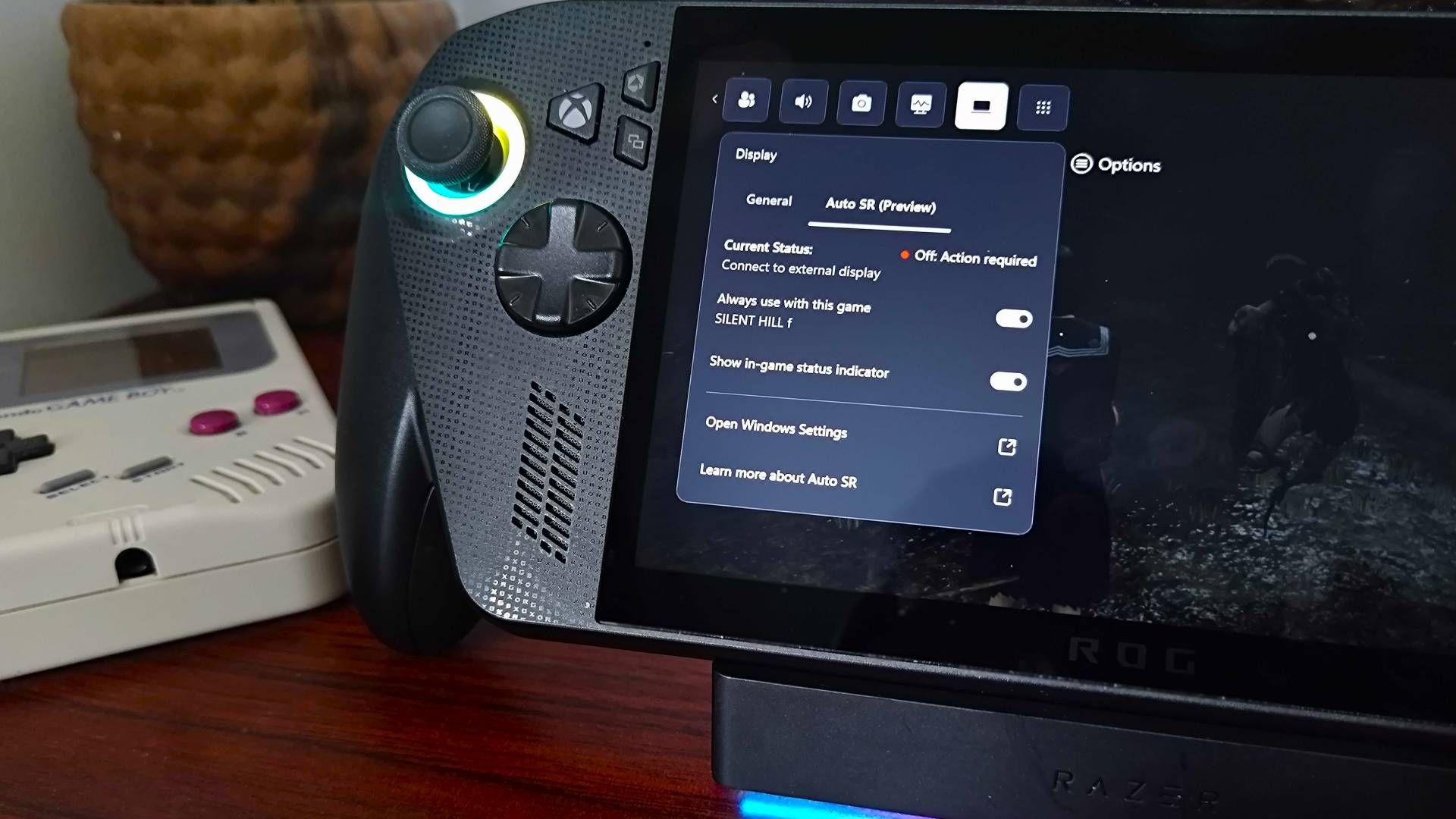
Microsoft has officially introduced Auto Super Resolution (Auto SR) capabilities for the ROG Ally X, bringing AI-driven upscaling technology to the handheld platform six months after its initial launch. While the feature aims to compete with established technologies like NVIDIA GeForce RTX 5090-class upscaling, its current implementation is restricted to docked mode, differentiating it from the portable-focused performance seen on devices like the Steam Deck OLED or the anticipated Steam Deck 2.
- Game/Platform: ROG Ally X (Windows)
- Developer: Microsoft
- Feature Status: Windows Insider Preview
- Requirement: Docked connection to external display
Understanding Auto SR on the ROG Ally X
For players curious about what are the new Auto SR features for Xbox Ally X, the tool functions as an operating system-level upscaler. Unlike proprietary solutions that require specific game engine integration, Auto SR is baked directly into Windows. This allows it to apply upscaling across a wide range of titles without individual developer support. However, as we reported here at In Game News, the current preview build imposes a strict hardware limitation: the feature will not activate unless the device detects an external display connection.
How to enable Auto SR on Xbox Ally X Windows Insider
Users currently enrolled in the Windows Insider program can access the feature through the updated Game Bar. To utilize the tool, navigate to the Display menu within the Game Bar interface after launching a compatible title. Once enabled, the system attempts to upscale the image to the target resolution of the connected monitor. If the device is not docked, the interface displays a notification indicating that an external display is required for the feature to function.
Performance and Implementation Challenges
The integration of Auto SR highlights a specific workflow for users. Because the feature operates at the OS level, it does not automatically adjust the game's internal resolution settings. For instance, in titles like Silent Hill f, users must manually set the in-game resolution to 720p before the Auto SR upscaling processes the final output. This manual requirement suggests that while the technology is functional, it currently lacks the seamless automation expected of a final, public-facing release.
The Docked-Only Constraint
Microsoft’s decision to limit the initial rollout to docked mode stems from their assessment of where the feature provides the most value. By targeting higher external resolutions, the company is prioritizing image clarity for desktop-like setups. This approach mirrors how upscaling is often utilized on platforms like the Nintendo Switch 2, where hardware resources are more heavily taxed when connected to larger screens. For those interested in handheld performance, our handheld gaming coverage notes that Microsoft has not ruled out future updates for non-docked play, though no timeline has been provided.
Visual Quality and Technical Trade-offs
Testing the feature reveals a noticeable improvement in visual fidelity. When active, Auto SR sharpens edges and enhances texture detail in complex environments, such as the foliage in Silent Hill f. The visual clarity gains are evident when comparing 720p native output against the AI-upscaled image. However, users should be aware that the performance overhead associated with the upscaling process means that frame rate gains are not always linear or guaranteed, depending on the intensity of the game being played.
Comparison of Upscaling Methods
The following table outlines how Auto SR compares to other common upscaling implementations in the current gaming market:
| Feature | Auto SR (Windows) | NVIDIA DLSS | Standard Scaling |
|---|---|---|---|
| Integration | OS-Level (Windows) | Game Engine | Monitor/GPU Scaler |
| Platform | Windows Handhelds | NVIDIA GPUs | Universal |
| Hardware Requirement | Docked Mode | RTX Hardware | None |
As we continue to monitor these developments, it is clear that Auto SR is intended to be a long-term project for Microsoft. The current preview phase serves as a testing ground for the software's stability and effectiveness across various hardware configurations. For more updates on portable gaming technology, you can follow our Windows gaming coverage.
Frequently Asked Questions
How does Auto Super Resolution work on Xbox Ally X?
Auto Super Resolution utilizes AI-powered upscaling, similar to NVIDIA DLSS, to improve image quality and frame rates by processing visuals at a lower resolution before scaling them up.
Does Xbox Ally X Auto SR require a docked connection?
Yes, in its current preview state for Windows Insiders, the Auto Super Resolution feature is restricted exclusively to docked mode when connected to an external display.
Is Xbox Ally X Auto SR worth using in 2026?
The feature provides visible improvements to edge sharpness and texture detail, though users must manually manage resolution settings, making it a situational tool for those playing on external monitors.
Nintendo Switch 2 Battery Maintenance Tips: Official 2026 GuidanceAnalysis
Is Rebounder Worth Playing in 2026? A PC Performance and Design ReviewAction
New DC Fighting Game from NetherRealm May Drop Injustice Branding in ...Handheld Gaming
Stickerino Roguelite Demo Launches on PC in 2026: Steam Deck OLED Ready